At the December 2025 Ceeview User Conference, Senior Product Engineer Guttorm Husveg delivered a technical walkthrough of Ceeview 2.18 — highlighting the enhancements now available to customers, why they matter in real-world environments, and how upcoming releases will continue to expand Ceeview’s capabilities across monitoring, data presentation, and platform architecture.
For organizations already running Ceeview 2.18 — and for those evaluating the platform — this release provides a clear view into how Ceeview is evolving: steadily, deliberately, and always grounded in operational reality.
What follows is a structured overview of the key innovations and platform advancements shared during Guttorm’s conference presentation.
Ceeview 2.18: A Release That Keeps Getting Better
Ceeview 2.18 was released in January 2025, and rather than being a one-and-done milestone, it has evolved continuously throughout the year.
- 12 updates delivered since initial release
- Latest update released November 2025
- Final 2.18 update released in January 2026
This steady cadence reflects how Ceeview develops: listening closely to customer usage, refining workflows, and improving usability without disrupting production environments.
Faster, More Intuitive Asset Insight
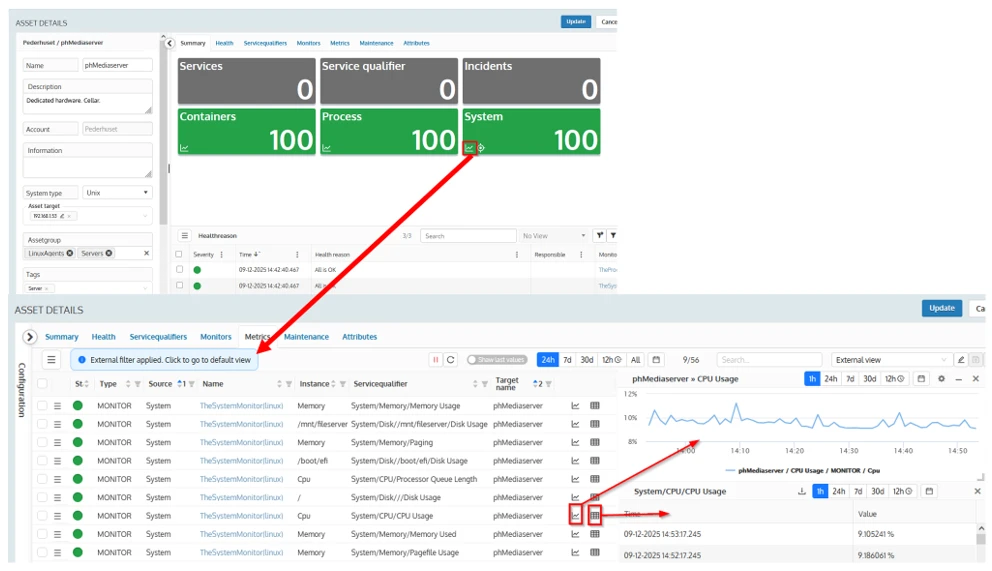
One of the most immediately noticeable improvements in 2.18 is the refinement of the Asset Details experience.
Finding the right data used to require jumping between tabs and filters. In 2.18, asset exploration is significantly faster:
- Direct access to monitor-specific metrics
- One-click paths from asset health → metric charts → tables
- Reduced navigation overhead when investigating performance issues
The result: less time searching, more time understanding — especially when diagnosing behavior like CPU, memory, or disk anomalies.
New and Improved Presentation Widgets
Presentation has always been a Ceeview strength, and 2.18 takes this further with several highly requested additions.
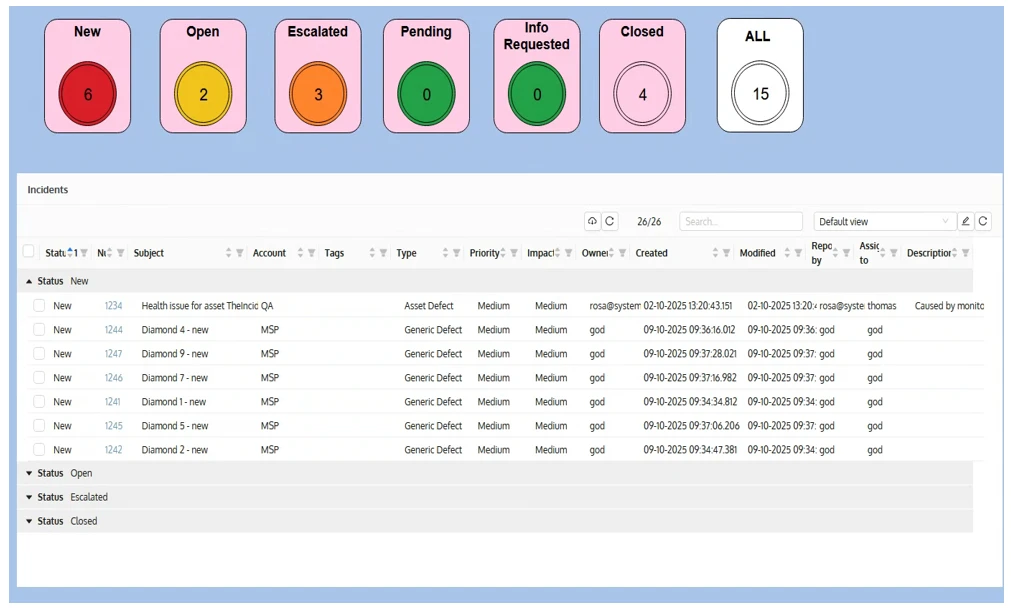
Incident Widget (Shapes)
The new incident shape widgets allow dashboards to visually represent incident status at a glance:
- New, Open, Escalated, Pending, Closed, or All
- Fully configurable colors, thresholds, and grouping
- Designed to align with how teams actually triage and prioritize work
This enables dashboards that communicate operational urgency, not just raw counts.
Asset Group Widget
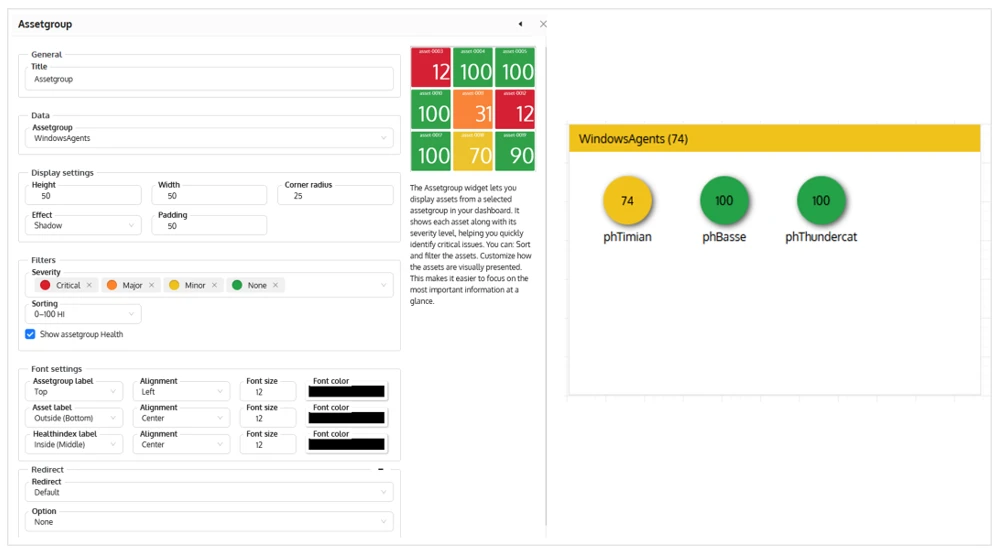
The Asset Group Widget brings structured visibility to collections of assets directly on dashboards:
- Visual health indicators per asset
- Customizable layout, sorting, and severity logic
- Ideal for MSPs, distributed environments, or large internal estates
This widget turns asset groups into actionable dashboard components, not just background structure.
Datasource Widgets: A Foundational Shift
A major theme in Guttorm’s presentation — and in Ceeview’s broader direction — is the growing role of datasources.
In 2.18, Ceeview introduced a new generation of datasource-driven widgets:
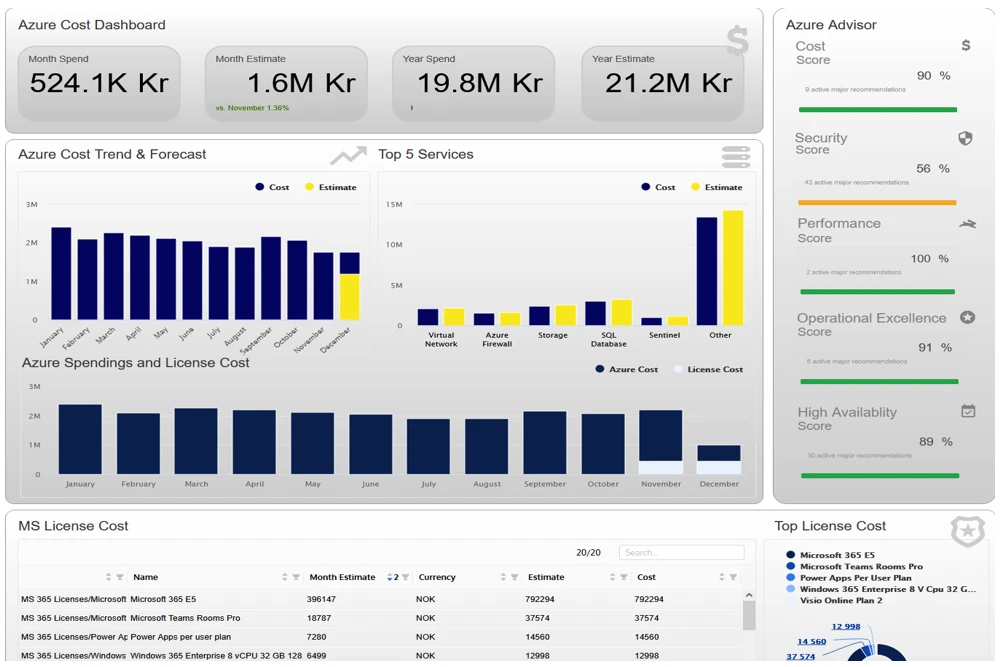
- Datasource Tile Widgets (single or multi-value KPIs)
- Datasource Charts (bar, line, area, pie)
- Datasource Grid Widgets (structured tabular views)
These widgets treat datasources like structured matrices or spreadsheets — flexible, reusable, and decoupled from any single monitoring origin.
Looking ahead, datasources are becoming the internal language of Ceeview — enabling broader integration, richer visualization, and easier reuse across dashboards and reports.
Watch the Ceeview Datasources deep-dive presentation from our User Conference:
Dashboard Duplication — Now Practical at Scale
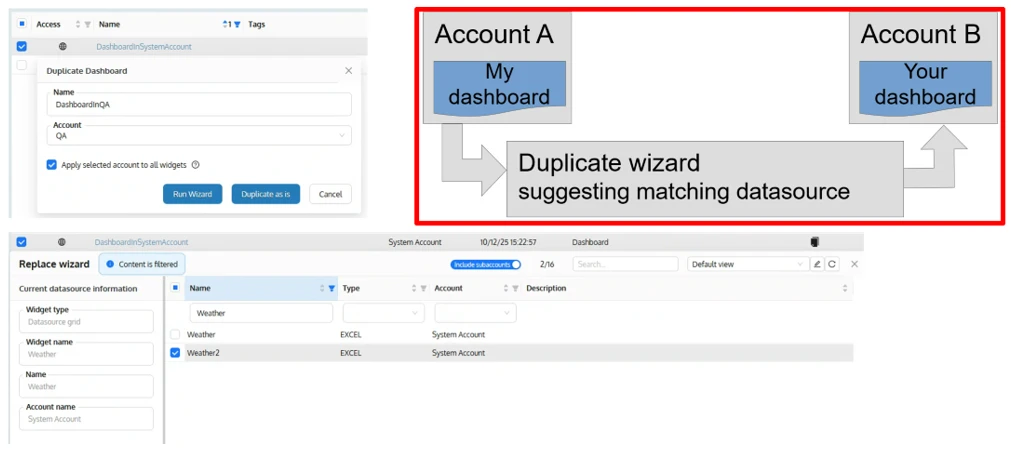
Duplicating dashboards across accounts used to be tedious. The new Dashboard Duplicate Wizard changes that.
With this wizard, users can:
- Duplicate dashboards between accounts
- Automatically detect and suggest matching datasources
- Reuse parent-account data when appropriate
- Dramatically reduce setup time in MSP and multi-account environments
This is an important step toward template-driven dashboards that scale cleanly across organizations.
Two-Way Ticketing Integration with ConnectWise
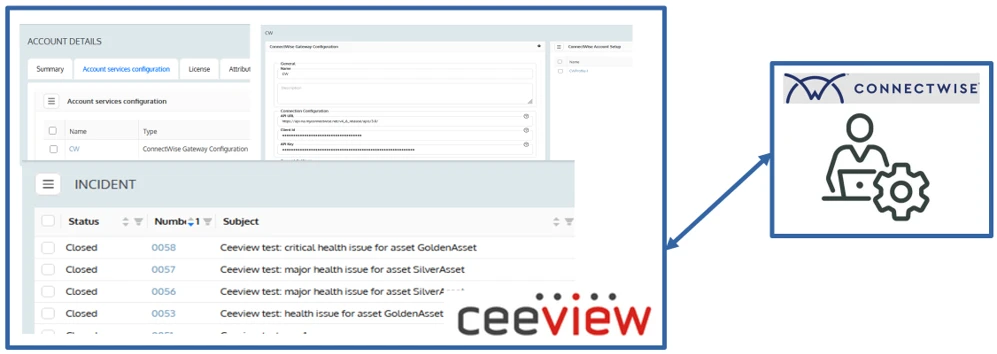
Ceeview 2.18 introduces the initial version of the ConnectWise Gateway — a true two-way synchronization between:
- Ceeview Incidents
- ConnectWise Service Desk tickets
Key capabilities include:
- Incident → ticket synchronization
- Ticket updates flowing back into Ceeview
- Support for parent and sub-account configurations
For teams already using ConnectWise, this creates a closed operational loop between monitoring and service management — without duplication or manual reconciliation.
NetFlow Monitoring — Practical Network Visibility
NetFlow monitoring has long promised deep insight into network traffic but has often been complex to deploy and difficult to use. With Ceeview 2.18, NetFlow becomes practical and operationally useful.
With Ceeview NetFlow, users can:
- Visualize network traffic intuitively
- Perform built-in WHOIS lookups
- Detect anomalies in real time
- Act on insights in just a few clicks
This is a strong step toward bringing network visibility into the same dashboards and workflows as system, service, and cost data.
Watch the NetFlow deep-dive presentation from our User Conference:
Behind the Scenes: Sidekick, File Manager, and Datasource Management
Several powerful capabilities arrived quietly in 2.18 through Sidekick, Ceeview’s innovation workspace:
- File Manager for moving, copying, uploading, and downloading files between agents and servers
- Datasource Manager for creating, editing, and inspecting datasource content
- Early access to features that will later receive full UI treatment
These tools reflect Ceeview’s philosophy: deliver capability early, refine through usage, and formalize when ready.
Beyond the Highlights: 2.18 Under-the-Hood Improvements
During his presentation, Guttorm encouraged users to review the full Ceeview 2.18 changelog for a deeper look at everything delivered throughout the release cycle. And with more than a dozen updates since the initial release, there’s a lot of substance behind the headline features.
Some notable enhancements customers will appreciate include:
- Improved dashboard usability and reliability, including better datasource drilldowns, CSV export for tables, enhanced legends, and more consistent chart behavior
- Stronger monitor resilience, with fixes and refinements across system, process, event log, NetFlow, SNMP, Linux, Windows, and cloud monitors
- Expanded datasource capabilities, such as improved parsing, pivot support, vault integration, and richer scripting hooks for advanced analysis
- Incident and notification improvements, including better tagging support, clearer root cause descriptions, and tighter integration with external systems
- Operational hardening across the platform, with fixes to agent communication, database handling, scheduling, caching, and startup behavior
Together, these updates reflect the ongoing work behind Ceeview 2.18: not just adding new capabilities, but polishing workflows, improving performance, and strengthening reliability in real-world environments.
For customers who want to explore the full list of fixes and enhancements — including many highly specific improvements driven directly by user feedback — the complete Ceeview 2.18 Bug Fixes and Updates document is available on the Ceeview FTP site.
What’s Coming Next: 2.19, 2.20, and 2.21
Guttorm closed his presentation with a clear look ahead.
Ceeview 2.19 (Planned Q1 2026)
A focused release centered on monitor intelligence and scalability:
- Monitor Overrides
Customize monitor behavior per asset without duplicating monitors - Monitor Templates – Phase 2
Distribute monitors from parent to sub-accounts via UI - Improved Monitor UIs
Including UI support for Windows Performance Monitor - Continued refinement of the System Monitor
Ceeview 2.20 & 2.21 (Later 2026)
These releases build on the same functional foundation, with one critical distinction:
- 2.20 continues on Java 8
- 2.21 transitions Ceeview to Java 17
Why this matters:
- Access to newer, more secure third-party libraries
- Reduced vulnerability noise from outdated dependencies
- A more future-proof platform for customers and partners
Beyond the runtime upgrade, focus areas include:
- Final phase of monitor templates (dynamic updates)
- Expanded monitor override support
- Continued evolution of datasource-driven presentation
- Early work toward dynamic dashboard templates
A Platform Built for Real-World Operations
Guttorm’s presentation made one thing clear:
Ceeview’s evolution is not about chasing trends — it’s about removing friction, improving clarity, and scaling operational intelligence across increasingly complex environments.
From faster asset insight to datasource-centric dashboards and a forward-looking platform roadmap, Ceeview 2.18 — and what follows — reinforces a simple truth:
Ceeview is built for people who need visibility they can actually use.
About the Author: